
National Asthma Council Australia pilot
papersGP pilot onboarding pack
Everything your practice needs to start preparing Asthma Action Plans with papersGP. Print this pack and keep it at reception.

Supported by National Asthma Council Australia
Participating practice
GPs, nurse practitioners, pharmacists & reception
Why act now
A written asthma action plan keeps patients out of hospital. papersGP prepares one, to NAC guidelines, in about 35 seconds.
The clinical case
40%1
fewer hospital admissions with a written action plan
20%1
fewer emergency department visits
32%2
of people with asthma have a current written plan — fewer than 1 in 3
The time it takes — measured
~35s
to prepare a plan, to NAC guidelines
8–10
clicks — no re-typing
- The NAC guideline built into every step
- Doses generated from a single selection
Time to prepare measured in our practice.
Lands on the patient’s phone
Share with school & pharmacist in a tap
NAC device-technique videos built in
Automatic review recall
Built for trust
2FA on every login
·
Patient-controlled data
·
Hosted in Australia
·
Aligned to the Australian Privacy Principles (APPs)
·
AES-256 · TLS 1.2+
Your practice is on the National Asthma Council Australia (NAC) pilot — papersGP is free for the whole pilot, no card, no charges. The five steps below take you from creating your account to sending a patient their Asthma Action Plan.
Your onboarding pathway — five steps
1
Create account
Provider or AHPRA number
2
Sign in
Email, then a texted code
3
Add your team
Invite by email
4
Add a patient
REF from your software
5
Build the plan
Review, sign, send
Start here
Scan to create your account
New to papersGP? Start at Step 1. Scan this code, or type the address below into any browser.
doctor.papersgp.com/register
References. 1 · Gibson PG, Powell H. Written action plans for asthma: an evidence-based review of the key components. Thorax 2004;59(2):94–99. 2 · Australian Bureau of Statistics. National Health Survey 2022. Cat. no. 4364.0.55.001. Time to prepare measured at Rozelle Total Health (our practice).
doctor.papersgp.com/register
Create your practice account
The practice owner or manager sets this up once. It creates your practice and your own clinician login in one step.
Supported by National Asthma Council Australia
Owner / practice manager
Do this first
Go to doctor.papersgp.com/register and register as a practitioner — this creates your practice and your first login. Because you're on the NAC pilot, your practice is set up for free pilot access, no card required.
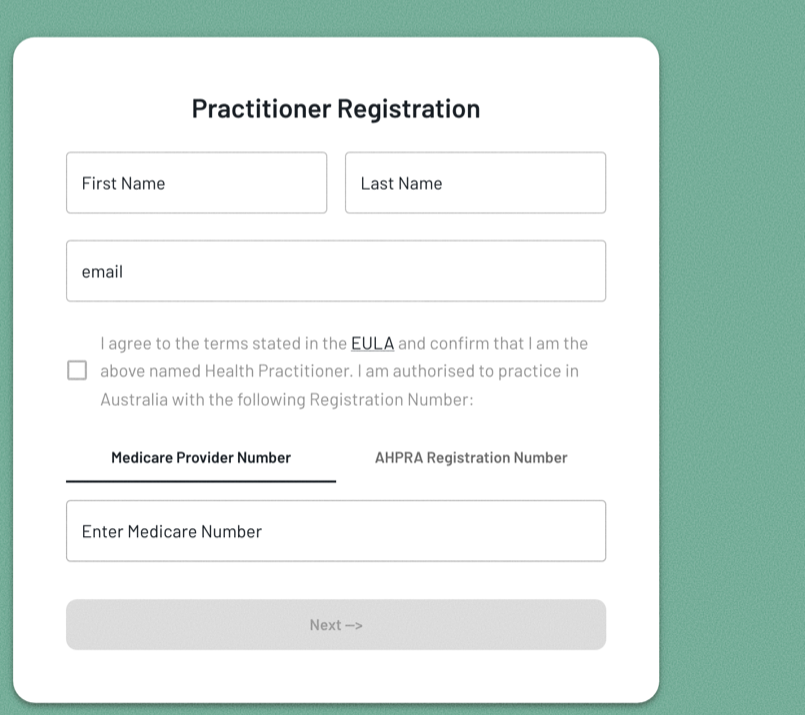
Practitioner registration
1
Enter your details
First and last name, email, and agree to the terms.
2
Add your registration number
Choose Medicare Provider Number or AHPRA and enter it. Treating doctors: use your Medicare Provider Number for this location — it's what lets referrals reach you (Step 3).
3
Verify mobile, set password
Enter the code we text you, then set a password. You're in.
Step 1
Scan to register
Opens the registration page. Your practice is comped for the pilot — you will not be asked for payment.
doctor.papersgp.com/register
Your dataAustralian-hosted·Encrypted·Developed to meet the Australian Privacy Principles
Go to doctor.papersgp.com/login, sign in with your email and password, then enter the 6-digit code we text to your registered mobile.
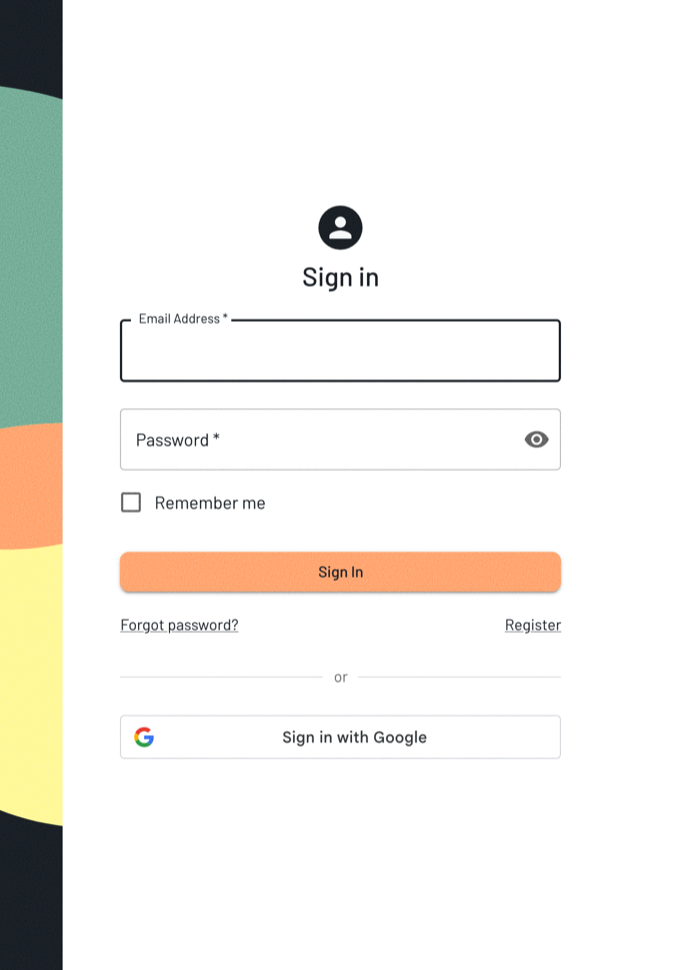
The sign-in screen
1
Open the sign-in page
Go to doctor.papersgp.com/login, or scan the code.
2
Email and password
Enter the email your practice registered you with, and your password.
3
Enter the 6-digit code
On the Verify OTP screen, type the code we text you. Codes are single-use; you can resend after 30 seconds.
Sign in
Scan to sign in
Keep this sheet by each workstation and the waiting-room device. Scan, or type the address into any browser.
doctor.papersgp.com/login
Didn't get a code?
Check the mobile number on your profile is correct, then resend (after 30 seconds). Forgot your password? Use Forgot password? on the sign-in screen. Still stuck — ask your papersGP pilot coordinator.
Your dataAustralian-hosted·Encrypted·Developed to meet the Australian Privacy Principles
Open Providers and invite each clinician and reception member by email. They accept and register themselves — their registration number, mobile and password. The same invite works whether or not they're already listed with NHSD.
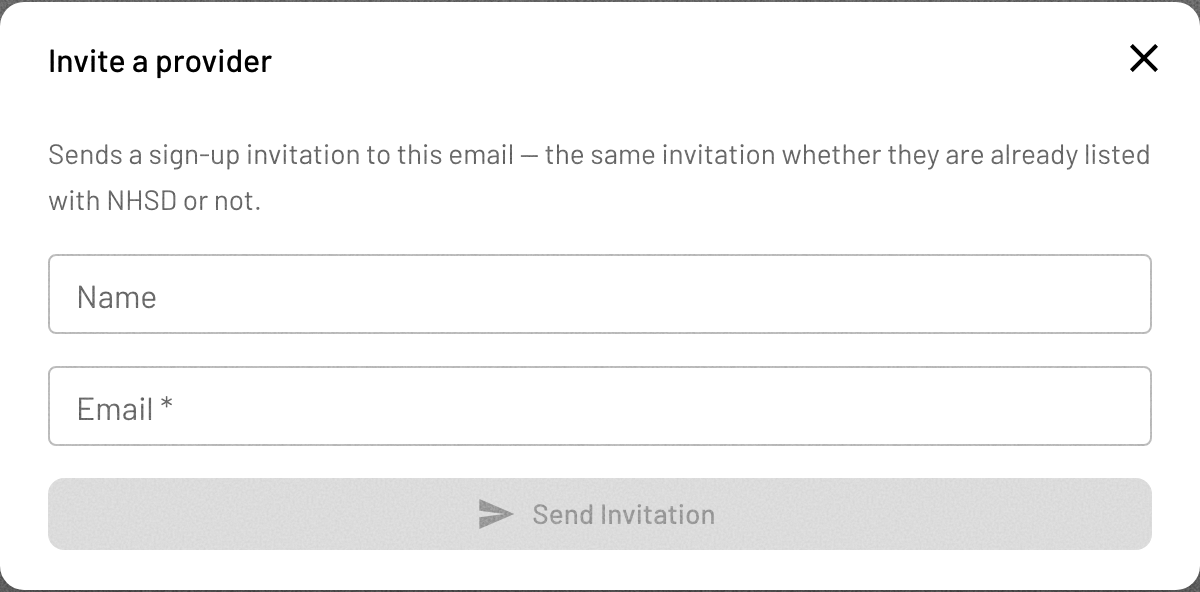
Invite a provider
1
Open Providers, tap Invite
In Providers, tap + Invite provider.
2
Name & email, Send
Enter their name and email, then Send Invitation.
3
They register
They accept and sign up to their scope of practice — doctors with a Medicare Provider Number; nurse practitioners, pharmacists & nurses with their AHPRA number.
All practitioners welcome — sign up to your scope of practice
GPs, nurse practitioners, clinical pharmacists and nurses all take part equally. An incoming HL7 / REF referral carries the treating doctor's identifier, so a treating doctor registers with their Medicare Provider Number for this location — that is what routes a referral to them and lists it in the practice. Practitioners without a provider number (nurse practitioners, pharmacists, nurses) sign up with their AHPRA number: they participate fully and are simply not referral targets. Check the details with your papersGP pilot coordinator.
For your team
Team members scan to sign in
Share this code with each invited member once they've accepted their invitation.
doctor.papersgp.com/login
Your dataAustralian-hosted·Encrypted·Developed to meet the Australian Privacy Principles
Sending a REF file emails the patient's details straight to papersGP, already matched to the patient and clinician — so they can start their forms without re-entering anything. Takes about 20 seconds.
1
Open the patient's record
In Best Practice, open the patient's file and confirm their name, date of birth and email are correct — these travel with the referral.
2
Open Letter Writer
From the patient record toolbar, click the New letter icon to open Letter Writer.
3
Click Email
In the Letter Writer toolbar, click the Email ( @ ) icon to open the Bp E-mail dialog.

Email
4
Address it to papersGP & choose REF
In the To field type forms@kiosk.papersgp.com. Under Attachment, select REF (not PDF). Then press Send.
Quick test
Scan to email papersGP
Opens a new email to papersGP on your phone for a quick test send. Day-to-day, send the REF from Best Practice as above.
forms@kiosk.papersgp.com
What the patient sees
The referral appears on the waiting-room device within seconds; reception hands the patient the tablet, forms pre-filled and ready.
Get these right
Address must be exactly forms@kiosk.papersgp.com. Attachment must be REF — a PDF will not load. Send from the clinician's provider account so the referral matches (Step 3).
Your dataAustralian-hosted·Encrypted·Developed to meet the Australian Privacy Principles
Open the patient and choose Asthma Action Plan. papersGP guides you through the steps — patient age group, recent GINA symptom-control, treatment approach, reliever and preventer — pre-filling from National Asthma Council guidance. Review and edit every value, then sign and send.
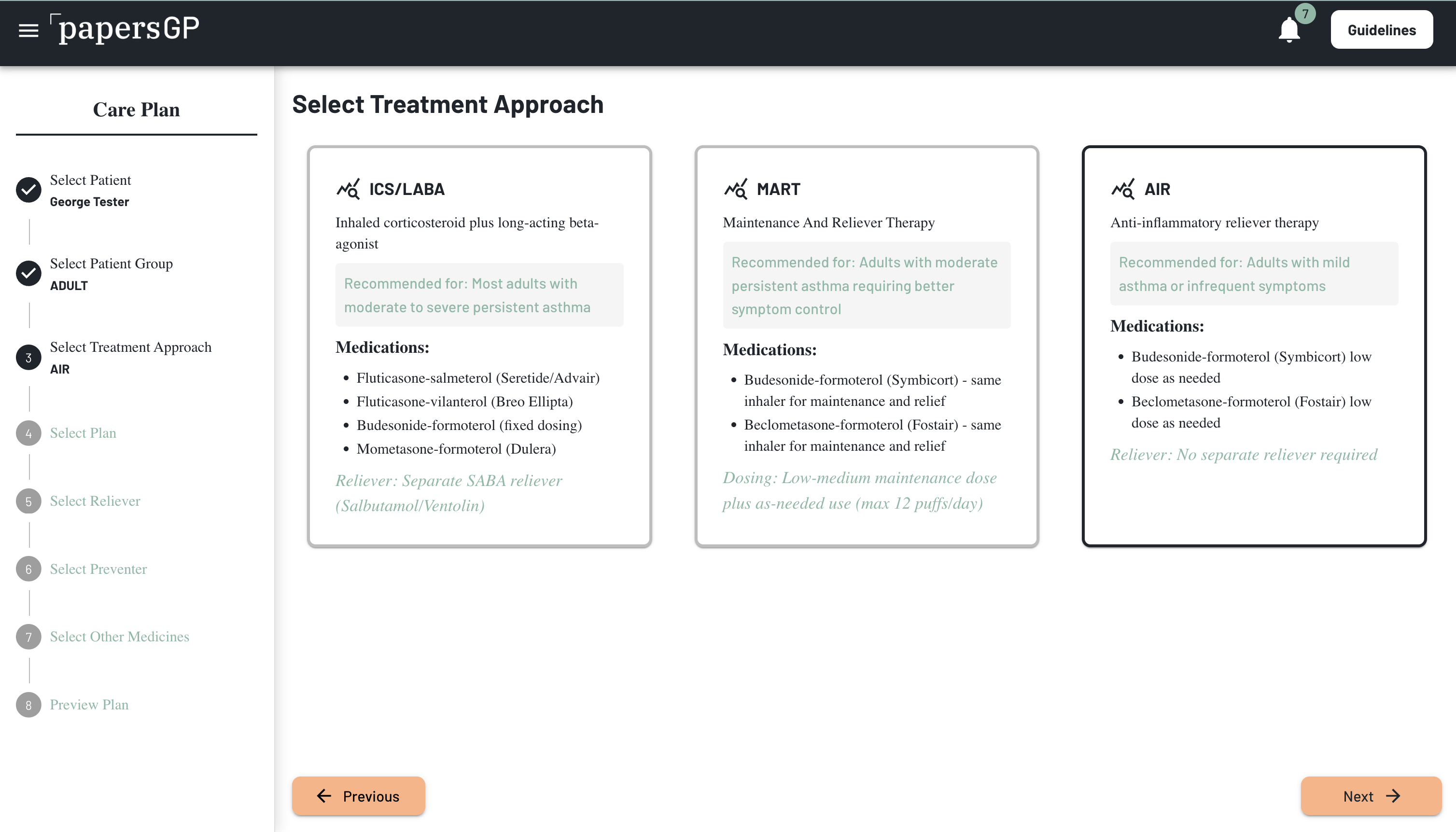
The guided Asthma Action Plan builder
Start
Scan to sign in and build a plan
Sign in, open the patient, and start their Asthma Action Plan.
doctor.papersgp.com/login
How the patient gets it
A secure link and a PDF — there is no print step. The plan reaches the patient's phone and can be reopened any time.
You're in control
Every pre-filled value is editable before you sign — papersGP prepares from NAC guidance, the decision is yours.
Your dataAustralian-hosted·Encrypted·Developed to meet the Australian Privacy Principles
When your doctor or nurse prepares your Asthma Action Plan, papersGP sends it to you as a secure link — by text message or email. Tap the link to open your plan on your phone. Nothing to download, and no password to set.
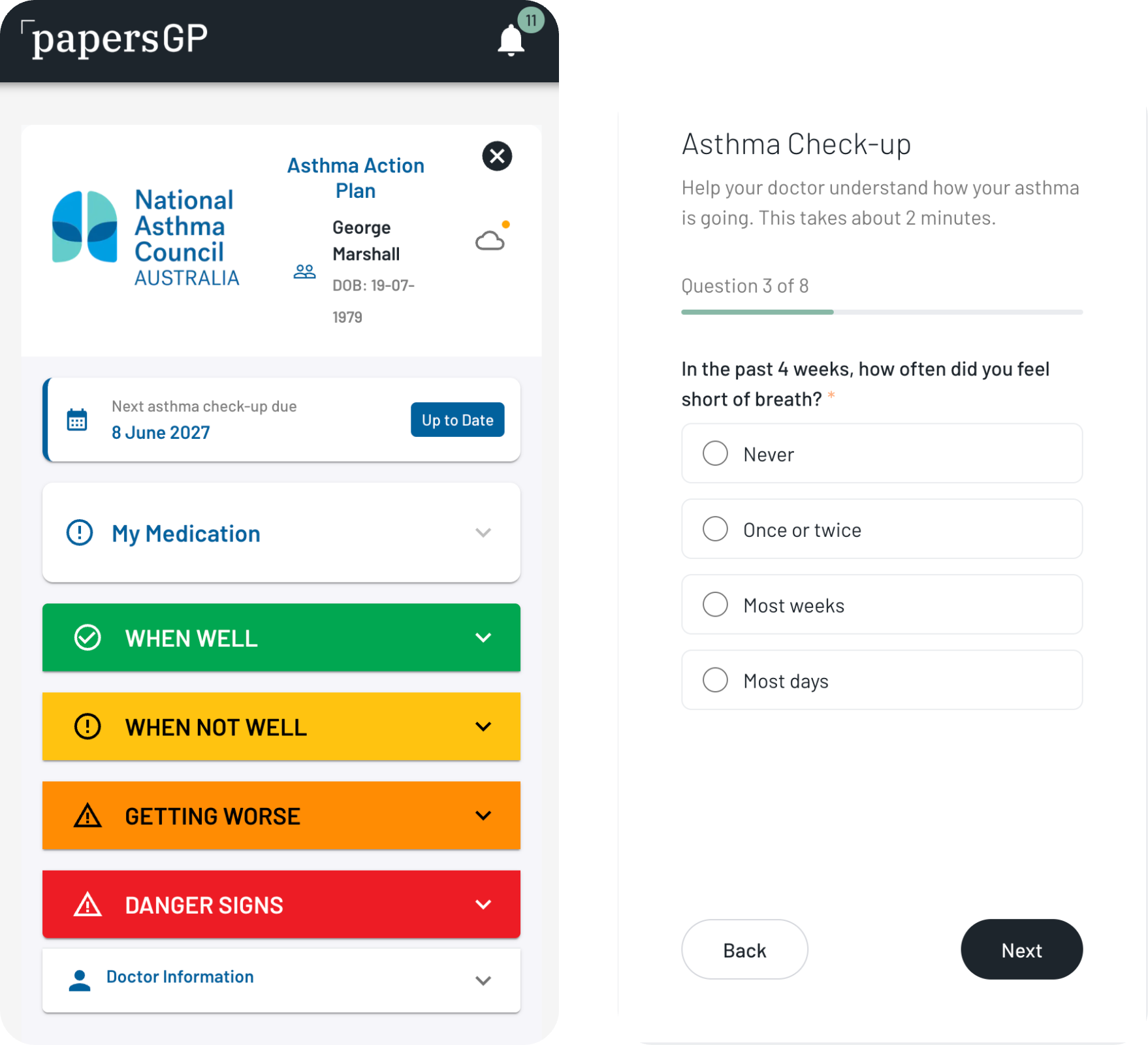
Your Asthma Action Plan on your phone — green, yellow and red zones, always with you
1
Check your phone
We text or email you a secure link when your plan — or a form to fill in — is ready.
2
Tap the link
Your plan opens on your phone. If it's a form, you can answer the questions right there.
3
Keep it handy
Your action plan shows your green, yellow and red zones — what to do each day, when your asthma gets worse, and in an emergency.
4
See it any time
Sign in at patient.papersgp.com with your email to reopen your plans whenever you need them.
Your plans
Scan to open the patient portal
Sign in with your email to see your Asthma Action Plan any time.
patient.papersgp.com
Your information is private
Your plan opens from a secure, single-use link, and you choose who you share it with.
Didn't get the link?
Check that reception has your correct mobile number and email, and ask them to send it again.
Your dataAustralian-hosted·Encrypted·Developed to meet the Australian Privacy Principles
papersGP believes in security and openness.
In plain language
What happens to my data?
Why do we collect it?
To help improve health care and health outcomes — for you, and for the wider community. Because of that, we take your privacy seriously and protect your information at every step.
Where is it kept?
In Australia (servers in Sydney) — not sent overseas.
Is it protected?
Yes — it's encrypted while it travels and while it's stored, and we keep a log of who opens your record and when.
Who can see it?
Only the practitioners looking after you, and anyone you choose to share it with — and you can stop sharing at any time. We never sell, rent or trade your information.
Is it used for research or to improve care?
Information about how guidelines and medications are used, and how people follow up, can be combined with information from others and stripped of the details that identify you — and used only in that form to improve health services and support activities like clinical audit. Any use for research also requires your explicit consent and ethics approval.
Is it used to train AI?
No — we don't train AI on your data, and we never send your identifiable health information to outside AI services.
Can I take it with me?
Yes — your records go with you. No clinician can lock you out or hold them back; you can ask for a copy, or have them sent to another provider, in a standard, portable format.
How long is it kept?
At least 7 years (longer for children), as Australian law requires — even if you or your clinician stop using papersGP.
What are my rights?
You can ask to see, correct, or (within those record-keeping laws) delete your information, and complain to the Office of the Australian Information Commissioner. We follow Australia's Privacy Act and the Australian Privacy Principles.
Your dataAustralian-hosted·Encrypted·Developed to meet the Australian Privacy Principles