
Quality outcomes & CPD evidence
See what’s accumulating across the plans and forms you’ve completed — and turn your reflection into evidence for your CPD.
Open Outcomes to see what’s building up across your practice — counts of the workflows you’ve completed, like NAC Asthma Action Plans. papersGP shows what’s accumulating; it doesn’t score, rank or judge. What the numbers mean is for you to decide.
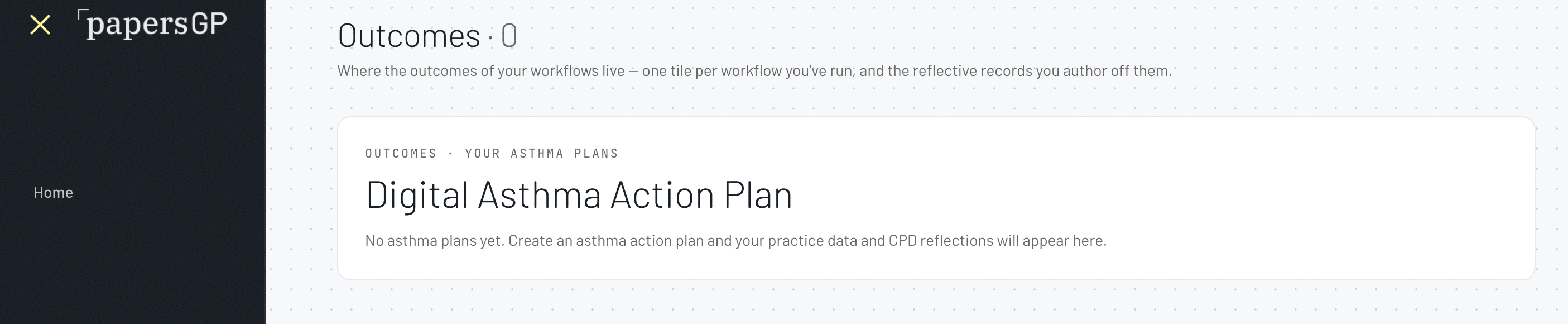
Open Outcomes
From the sidebar, open Outcomes (/outcomes). You’ll see a tile for each workflow you’ve run — its counts and latest activity. Tiles stay empty until you’ve completed one.
Read what’s accumulating
Outcomes shows counts only — how many plans and forms, and their status. There are no scores, benchmarks or traffic-lights; what the numbers mean is yours to read.
Reflect
Add a reflection against your outcomes — a short, structured note on what you’re seeing and what you’ll do next. Answer the prompts and Save.
Download your CPD evidence
Once a reflection is complete, download your reflective record for your CPD portfolio. papersGP evidences your reflection — it does not award CPD hours; your CPD home recognises the activity.
Scan to sign in
Open papersGP and go to Outcomes to see what you’ve accumulated and add a reflection.
doctor.papersgp.com/outcomes